

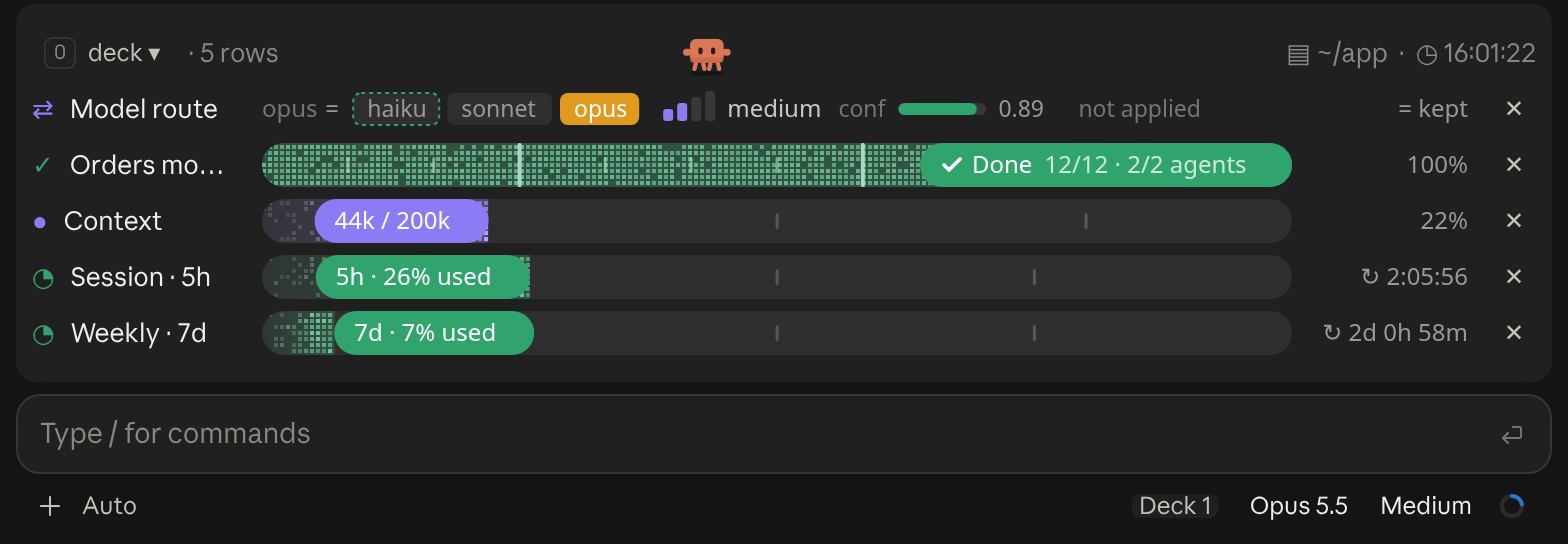
A cockpit for Claude Code: plan bars and subagent strips, context, usage limits with reset countdowns and burn rates, spend, the model route and a pet. Six bar styles, three collapsed looks. CLI and Desktop.
Watch Claude Code's 5-hour and 7-day limits
A one-line band above the prompt with your 5-hour and 7-day limit use and reset times, the context window's tokens, and the last turn's prompt-cache hit rate.
Terminal
≡ 44K/200K ● 5% [-]Claude Desktop

A band above the prompt showing your 5-hour and 7-day limits, context window and prompt-cache hit rate, styled for the terminal and the desktop app
Usage Band puts them in a band above the prompt, as a bar per window with the percent used and the time until it resets. The figures come from your subscription's rate-limit headers, so they appear after the session's first response and only on a subscription.
It's the last turn's cache reads over all of its input (uncached tokens, cache reads and cache writes), summed over the turn's requests. Usage Band turns it red when it falls under 50%.
Set USAGE_BAND_ICONS in your shell profile to auto, nerd, unicode or ascii, for example export USAGE_BAND_ICONS=unicode. Run /usage-band-preview to see every terminal style side by side.
No. Its README says it reads the session's usage figures and the TERM_PROGRAM and USAGE_BAND_ICONS environment variables, adds /usage-band-preview, and draws the band. statuslin.es's checks found no file writes, programs or internet access.
Own this listing? Add it to your README. The badge shows the install count as it grows.

[](https://staging.statuslin.es/mods/usage-band?utm_source=readme-badge)
Or show the preview card:
[](https://staging.statuslin.es/mods/usage-band?utm_source=readme-badge)
A cockpit for Claude Code: plan bars and subagent strips, context, usage limits with reset countdowns and burn rates, spend, the model route and a pet. Six bar styles, three collapsed looks. CLI and Desktop.
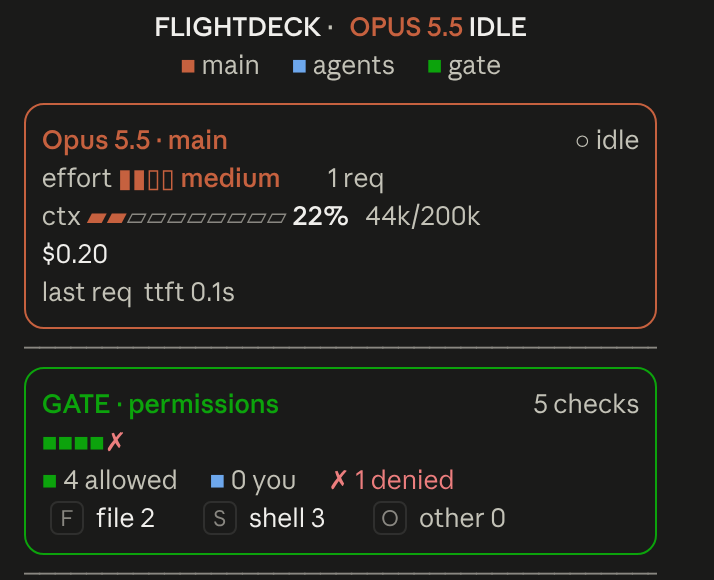
Flightdeck: a live agent dashboard for Claude Code. Main model vitals, an on-call architect, every permission check, subagent cards and swimlanes, a turn receipt and a session log, all from real session events
                                 ▀▄   ▄▀                                                        [-]
                                ▀▀▀▀▀▀▀▀▀
                                ▀▀▀▀▀▀▀▀▀
                             ▀▄ ▄▀▀▀▀▀▀▀                                                   ▀▀▀▄▄▄
                               ▀▀▀▀▀▀▀▀                                                   ▀▀▀▀▀▀▀▀
 ctx 22%                                             [ Pet ♥ ] [ ⚙ ] [ ↻ Adventurer ] [ Hide ]
A little pixel cat that wanders above the Claude Code prompt, watches your usage limits and announces when work finishes; or switch packs for an adventurer who mines, chops trees and fights zombies

An animated pixel-art companion above your prompt that reacts to your session and your typing, with a live context meter.
  Opus 4.8 high ✦ │ ctx 22% │ app (main) │ PR #1287 ● │ $0.41 · 10m +128 -34
  Session ● ● ● ● ● ● ● ● ○ ○ ○  74% left  Resets in 2h 6m
  Weekly  ● ● ● ● ● ● ● ● ● ● ○  93% left  Resets in 2d 0h
Feature-rich bash status line with model, context bar, session cost (read live from Claude Code, so it stays correct on any model), rate-limit bars, and live tool/agent activity that adapts to terminal width. Source: github.com/JungHoonGhae/claude-statusline
  ✧ ███████████▋     73%  🗝  Ultima Weapon  ✦ app ∙ main
  ♥ ████████████████████████ 100% 「SAVE POINT」  ✶ Limit Form  ◉ 41
Claude Code plan-usage HP bar that reads the Claude auth token to show remaining usage.
app · main · Opus-4.8 · effort high · ctx 22% · 5h 26% ↻2h6m · 7d 7% ↻2d0hFolder, git branch, model (color-coded by family), effort, context usage, and 5h/7d rate-limit usage with reset countdowns — all on one line, each percentage going green → yellow → red as it climbs. Needs jq.
[Opus 4.8] | ━━━━━━ 22% (44K/200K) | app | git:(main) | ⏱ 10m
Single-line status with a context bar, H/W usage limits, project, git branch, MCP server count, and a session timer, with cross-platform credential lookup. Source: github.com/AndyShaman/claude-statusline


