

Opus 4.8 high ✦ │ ctx 22% │ app (main) │ PR #1287 ● │ $0.41 · 10m +128 -34
Session ● ● ● ● ● ● ● ● ○ ○ ○ 74% left Resets in 2h 6m
Weekly ● ● ● ● ● ● ● ● ● ● ○ 93% left Resets in 2d 0h
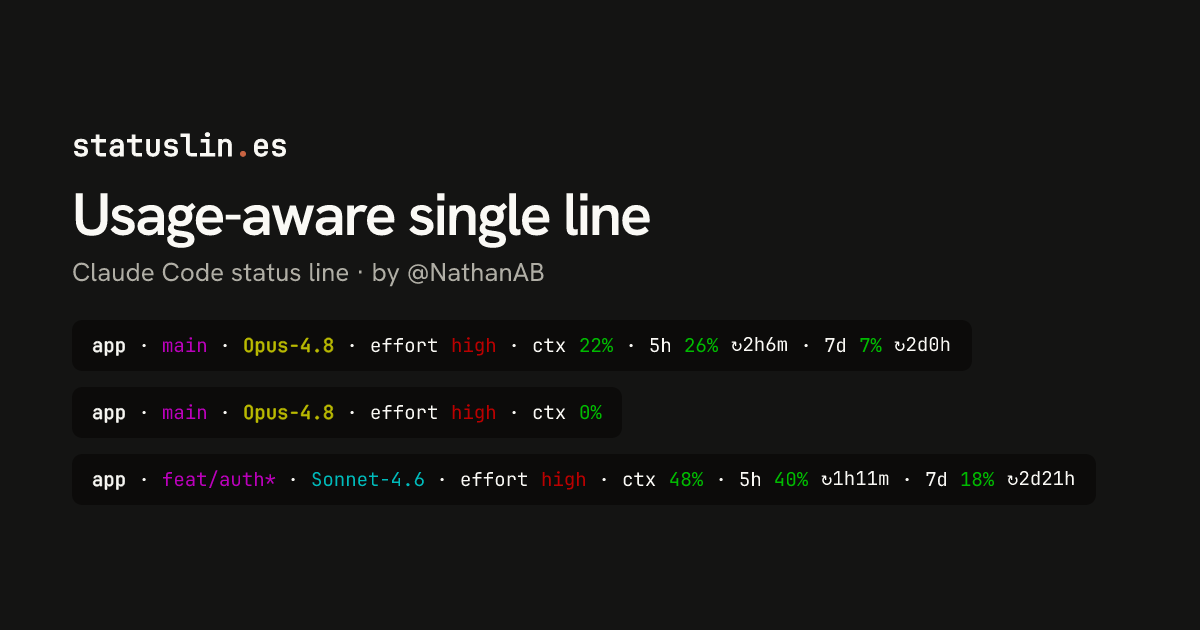
Usage-aware single line
Folder, git branch, model (color-coded by family), effort, context usage, and 5h/7d rate-limit usage with reset countdowns — all on one line, each percentage going green → yellow → red as it climbs. Needs jq.
Before you install
- This version was reviewed before it was listed on Jun 13, 2026
- Doesn't ask to connect to the internet
- Needs jq and git.
- Effort comes from effortLevel in ~/.claude/settings.json, not the session, so every preview showed high.
- Model color follows the family (Opus bold yellow, Sonnet cyan, Haiku blue); others, such as Fable, stay plain.
Preview
Clean repo
app · main · Opus-4.8 · effort high · ctx 22% · 5h 26% ↻2h6m · 7d 7% ↻2d0hNew session
app · main · Opus-4.8 · effort high · ctx 0%Dirty branch
app · feat/auth* · Sonnet-4.6 · effort high · ctx 48% · 5h 40% ↻1h11m · 7d 18% ↻2d21hNear-full
app · main · Opus-4.8 · effort high · ctx 91% · 5h 88% ↻17m · 7d 61% ↻19h59m · Explanatory1M context
app · main · Fable-5 · effort high · ctx 64% · 5h 33% ↻3h29m · 7d 12% ↻4d23hPost-compact
app · main · Haiku-4.5 · effort high · ctx 0% · 5h 52% ↻4h1mWorktree
feature · worktree-feature · Opus-4.8 · effort high · ctx 37% · 5h 44% ↻2h49m · 7d 20% ↻1d6hNon-git
scratch · Opus-4.8 · effort high · ctx 22%What it does
One line with folder, git branch, model, effort, context use, and the 5-hour and 7-day rate limits with reset countdowns. Percentages turn yellow, then red, as they climb.
- Written in
- Bash
- Network access
- None requested
- Works in
- Terminal
How it works
- Reads folder, model, context and rate-limit fields from the stdin JSON with jq.
- Runs git in that folder for the branch and adds * when there are uncommitted changes.
- Colors each percentage green under 50, yellow from 50 and red from 80, with a ↻ countdown.
- Skips 5h or 7d until Claude Code reports it, and shows the output style unless default.
Source
#!/bin/bash

input=$(cat)

dir=$(echo "$input" | jq -r '.workspace.current_dir')
model=$(echo "$input" | jq -r '.model.display_name')
model_id=$(echo "$input" | jq -r '.model.id')
output_style=$(echo "$input" | jq -r '.output_style.name')

dim="\033[2m"
reset="\033[0m"
bold="\033[1m"
cyan="\033[36m"
yellow="\033[33m"
green="\033[32m"
red="\033[31m"
magenta="\033[35m"
blue="\033[34m"

# Color helper: green <50, yellow 50-79, red >=80
color_for_pct() {
    local p=$1
    if [ "$p" -ge 80 ]; then echo "$red"
    elif [ "$p" -ge 50 ]; then echo "$yellow"
    else echo "$green"; fi
}

# Format a duration in seconds → "2h13m" / "47m" / "3d4h"
fmt_duration() {
    local s=$1
    [ "$s" -lt 0 ] && s=0
    local d=$((s / 86400))
    local h=$(((s % 86400) / 3600))
    local m=$(((s % 3600) / 60))
    if [ "$d" -gt 0 ]; then
        printf "%dd%dh" "$d" "$h"
    elif [ "$h" -gt 0 ]; then
        printf "%dh%dm" "$h" "$m"
    else
        printf "%dm" "$m"
    fi
}

# --- Line 1: orientation ---

dir_name=$(basename "$dir")

git_info=""
if git -C "$dir" rev-parse --git-dir &>/dev/null; then
    branch=$(git -C "$dir" -c core.useBuiltinFSMonitor=false rev-parse --abbrev-ref HEAD 2>/dev/null || echo '')
    if [ -n "$branch" ]; then
        if git -C "$dir" -c core.useBuiltinFSMonitor=false diff-index --quiet HEAD -- 2>/dev/null; then
            git_info="$branch"
        else
            git_info="${branch}*"
        fi
    fi
fi

short_model=$(echo "$model" | sed 's/Claude //' | sed 's/ /-/g')
if [[ "$model_id" == *"opus"* ]]; then
    model_str="${bold}${yellow}${short_model}${reset}"
elif [[ "$model_id" == *"sonnet"* ]]; then
    model_str="${cyan}${short_model}${reset}"
elif [[ "$model_id" == *"haiku"* ]]; then
    model_str="${blue}${short_model}${reset}"
else
    model_str="${short_model}"
fi

ctx_pct=$(echo "$input" | jq -r '.context_window.used_percentage // 0' | cut -d. -f1)
ctx_color=$(color_for_pct "$ctx_pct")

now=$(date +%s)
fh_pct_raw=$(echo "$input" | jq -r '.rate_limits.five_hour.used_percentage // empty')
sd_pct_raw=$(echo "$input" | jq -r '.rate_limits.seven_day.used_percentage // empty')

effort=$(jq -r '.effortLevel // empty' ~/.claude/settings.json 2>/dev/null)
case "$effort" in
    xhigh)  effort_str="${bold}${red}xhigh${reset}" ;;
    high)   effort_str="${red}high${reset}" ;;
    medium) effort_str="${yellow}med${reset}" ;;
    low)    effort_str="${green}low${reset}" ;;
    "")     effort_str="" ;;
    *)      effort_str="${dim}${effort}${reset}" ;;
esac

sep="${dim} · ${reset}"
line="${bold}${dir_name}${reset}"
[ -n "$git_info" ] && line+="${sep}${magenta}${git_info}${reset}"
line+="${sep}${model_str}"
[ -n "$effort_str" ] && line+="${sep}${dim}effort${reset} ${effort_str}"
line+="${sep}${dim}ctx${reset} ${ctx_color}${ctx_pct}%${reset}"

if [ -n "$fh_pct_raw" ]; then
    fh_pct=$(printf "%.0f" "$fh_pct_raw")
    fh_color=$(color_for_pct "$fh_pct")
    fh_reset=$(echo "$input" | jq -r '.rate_limits.five_hour.resets_at // empty')
    fh_suffix=""
    [ -n "$fh_reset" ] && fh_suffix=" ${dim}↻$(fmt_duration $((fh_reset - now)))${reset}"
    line+="${sep}${dim}5h${reset} ${fh_color}${fh_pct}%${reset}${fh_suffix}"
fi

if [ -n "$sd_pct_raw" ]; then
    sd_pct=$(printf "%.0f" "$sd_pct_raw")
    sd_color=$(color_for_pct "$sd_pct")
    sd_reset=$(echo "$input" | jq -r '.rate_limits.seven_day.resets_at // empty')
    sd_suffix=""
    [ -n "$sd_reset" ] && sd_suffix=" ${dim}↻$(fmt_duration $((sd_reset - now)))${reset}"
    line+="${sep}${dim}7d${reset} ${sd_color}${sd_pct}%${reset}${sd_suffix}"
fi

if [ "$output_style" != "null" ] && [ "$output_style" != "default" ]; then
    line+="${sep}${dim}${output_style}${reset}"
fi

printf "%b" "$line"
Badge for your README
Own this listing? Add it to your README. The badge shows the install count as it grows.

[](https://staging.statuslin.es/c/usage-aware-single-line-2d7134f8?utm_source=readme-badge)
Or show the preview card:
[](https://staging.statuslin.es/c/usage-aware-single-line-2d7134f8?utm_source=readme-badge)
More status lines
[Opus 4.8] | ━━━━━━ 22% (44K/200K) | app | git:(main) | ⏱ 10m
Opus 4.8 │ ✍️ 78% │ app (main) │ +128/-34

Cost    $0.4100
Tokens  in 44.0k │ cache write 5000 │ cache read 2000 │ out 1.4k
Opus 4.8 │ ✍️ 22% │ app (main) │ ● high

current ●●○○○○○○○○  26% ⟳ 3:35pm
weekly ○○○○○○○○○○ 7% ⟳ oct 20, 2:28pm ✧ ███████████▋ 73% 🗝 Ultima Weapon ✦ app ∙ main
♥ ████████████████████████ 100% 「SAVE POINT」 ✶ Limit Form ◉ 41
Opus 4.8 │ main │ app │ ▓▓░░░░░░░░ 44k/200k │ $0.41
Related mods


Shows branch safety, context headroom, and account usage in a compact session telemetry strip

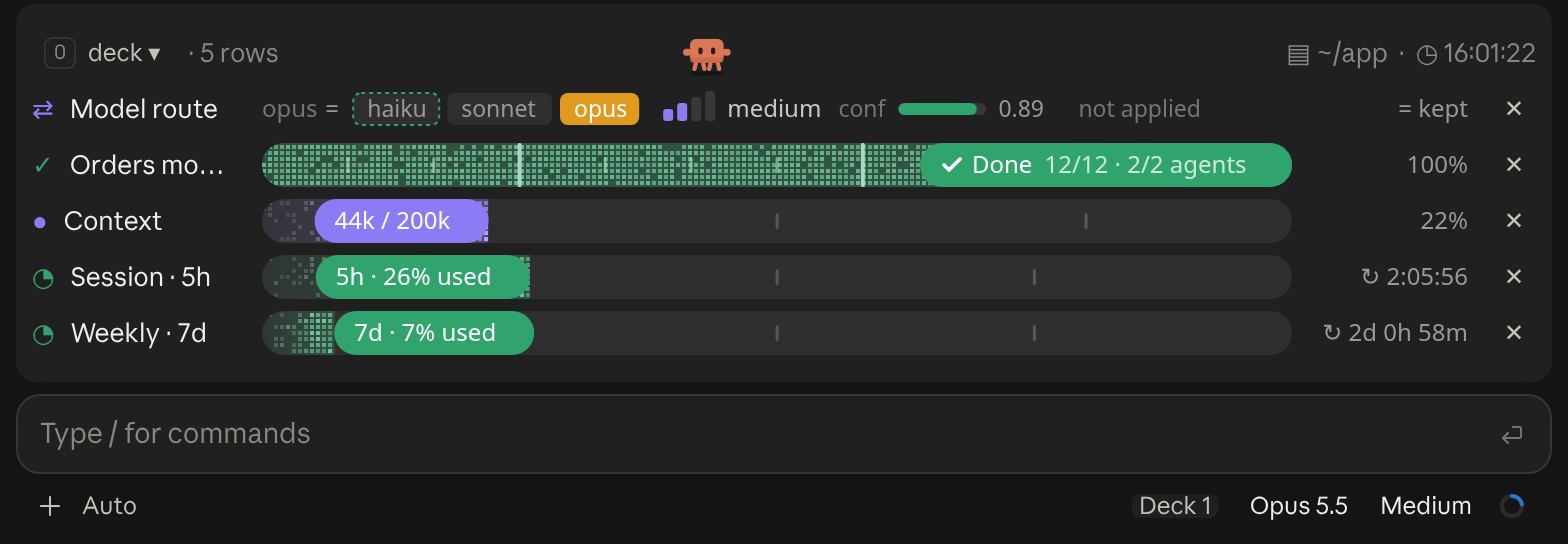
A cockpit for Claude Code: plan bars and subagent strips, context, usage limits with reset countdowns and burn rates, spend, the model route and a pet. Six bar styles, three collapsed looks. CLI and Desktop.

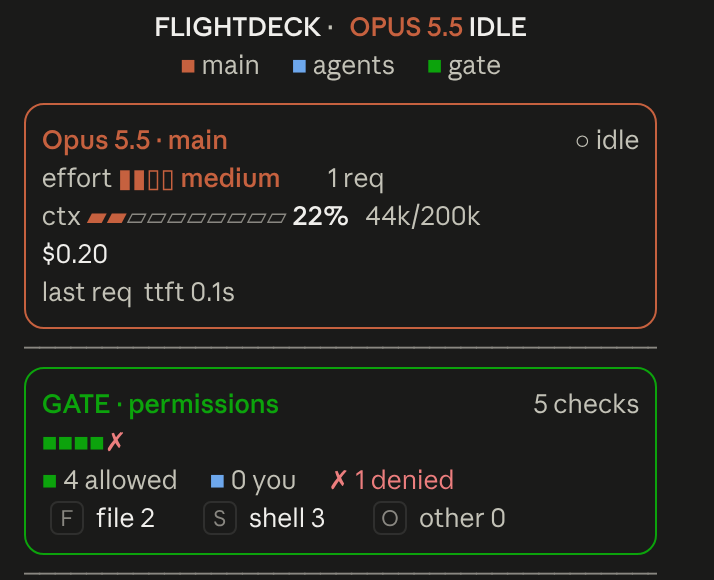
Flightdeck: a live agent dashboard for Claude Code. Main model vitals, an on-call architect, every permission check, subagent cards and swimlanes, a turn receipt and a session log, all from real session events

                                 ▀▄   ▄▀                                                        [-]
                                ▀▀▀▀▀▀▀▀▀
                                ▀▀▀▀▀▀▀▀▀
                             ▀▄ ▄▀▀▀▀▀▀▀                                                   ▀▀▀▄▄▄
                               ▀▀▀▀▀▀▀▀                                                   ▀▀▀▀▀▀▀▀
 ctx 22%                                             [ Pet ♥ ] [ ⚙ ] [ ↻ Adventurer ] [ Hide ]
A little pixel cat that wanders above the Claude Code prompt, watches your usage limits and announces when work finishes; or switch packs for an adventurer who mines, chops trees and fights zombies